

Why Selecting the Right LLM Model Matters for Your AI Agents

Yash Shah
TL;DR
Selecting the right LLM model saves money, improves speed, and makes AI agents more reliable. Match the model to the task—fast models for simple jobs, flagship models for complex reasoning and tool use.
The “best” model is the one that fits the job
If you have ever built an AI agent and felt like the results were slow, expensive, or oddly stubborn, the problem might not be your prompt or your tools. It might be the model running the show.
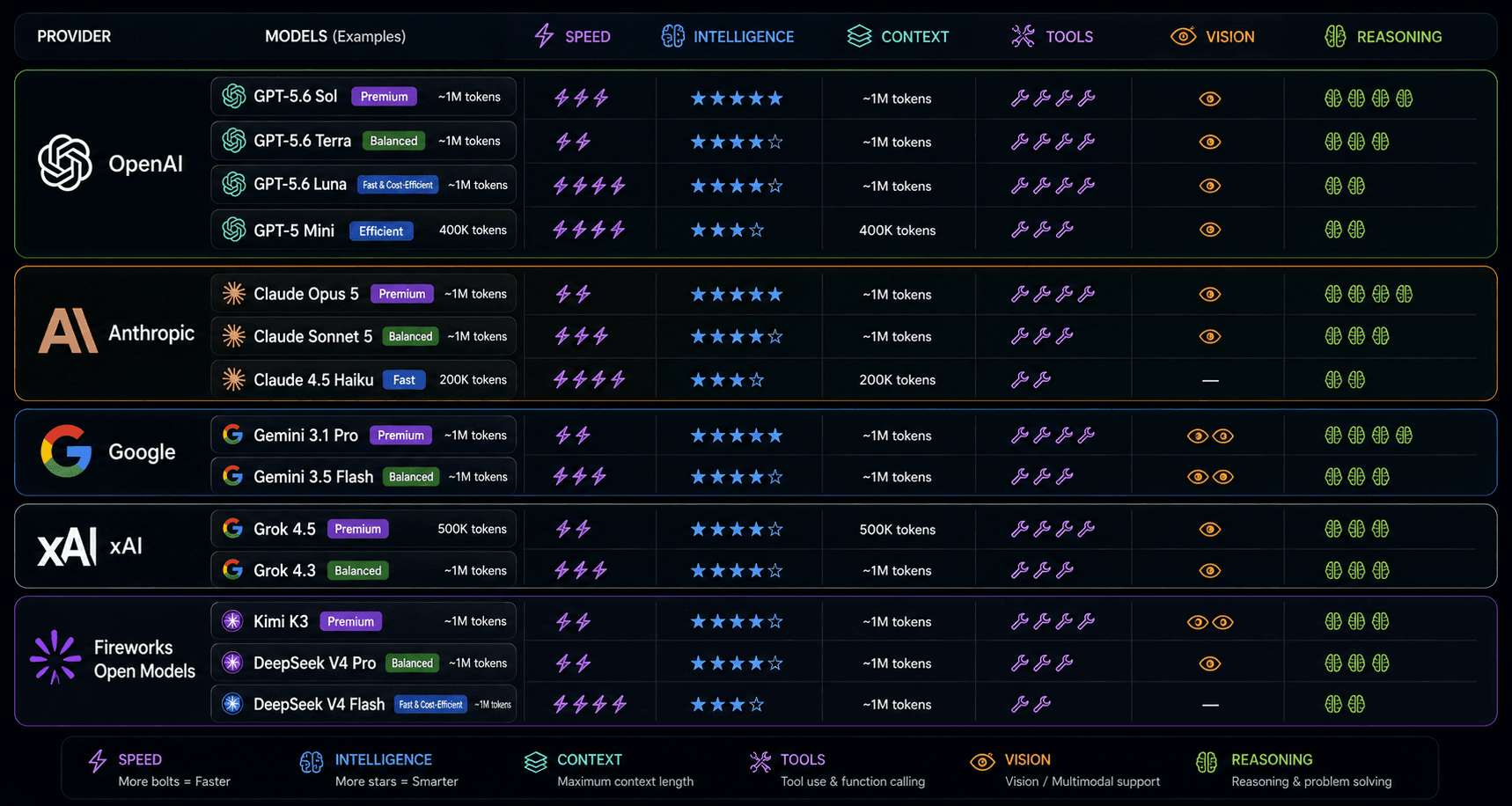
Large language models (LLMs) are the brain behind every agent. But not every brain works the same way. Some are built for speed and low cost. Others are designed for deep reasoning, careful writing, or understanding images. Picking the right one is not about finding a single “best” model — it is about matching the model to the task, the budget, and the workflow.
What actually changes when you switch models
Switching models is not just a minor tweak. It changes how your agent behaves in four concrete ways:
- Reasoning quality. Some models handle complex, multi-step instructions better. Others are great at quick, predictable answers but struggle with nuance.
- Tool-calling reliability. If your agent needs to search the web, read a file, or send an email, the model must consistently decide when to use a tool and when to answer directly. Not all models do this equally well.
- Speed and cost. Smaller or mid-tier models are faster and cheaper per run. Flagship models cost more but can handle harder jobs without breaking.
- Vision and multimodal support. If your agent reads screenshots, scans, or images, you need a model that can actually “see” — not all of them can.
In other words, the model is not a generic engine you swap without consequences. It is a core part of your agent’s design.
Match the model to the job
Here is how to think about it in practice:
- Fast drafts and classification. Use a smaller, efficient model for sorting emails, tagging tickets, or generating first-pass summaries. The job is simple; speed and cost matter most.
- Complex tool use and multi-step work. Use a flagship model when the agent must plan several steps, use multiple tools, or reason through ambiguous inputs. Think sales qualification, research synthesis, or customer-support triage.
- Vision or multimodal inputs. If the agent reads invoices, charts, or screenshots, choose a model with built-in vision support.
- Highly regulated or sensitive work. Some teams standardize on one provider for compliance or data-policy reasons. Your platform should support that choice without forcing a single vendor.
The wrong model for the job does not just underperform — it wastes money on unnecessary tokens or forces you to over-engineer prompts to compensate.
The cost-speed-quality triangle
Every model sits somewhere on a triangle of cost, speed, and quality. You rarely get all three at once. The good news is that many workflows do not need maximum quality at every step.
A smart approach is to start with a capable mid-tier model and escalate only when the quality bar demands it. For example, a fast classifier can decide whether an email is urgent; then a stronger model can draft the reply only when needed. This tiered strategy keeps costs low without sacrificing outcomes.
Why this matters in Agent Studio
In Agent Studio, every agent gets its own model selection. That means you can build a team of specialized agents, each running the model that fits its job. A fast classifier agent can run on a lightweight model while a writing or research agent runs on a flagship model — all within the same workspace.
You can also mix providers. If your company standardizes on Anthropic for policy reasons, but another team prefers OpenAI for vision tasks, both are available. You can fund runs through workspace credits or bring your own API keys (BYOK), so you control both the model and who pays for it.
The key point: model choice is a first-class setting, not a hidden server default. It is part of how you design an agent, not an afterthought.
A simple checklist for picking your model
Before you deploy an agent, ask these five questions:
- What is the hardest part of this task — reasoning, tool use, or creative writing?
- Does the agent need to read images, PDFs, or other files?
- How many runs per day will this agent handle? (Volume drives cost.)
- What is the cost of being wrong? (High-stakes tasks justify stronger models.)
- Do we have a provider preference for compliance or data policy?
Answer honestly, and the right model usually becomes obvious. Then test it in the playground, run evals to measure quality, and monitor traces to see real-world latency and token usage before scaling up.
Model choice is not the whole story
Even the perfect model will fail if the agent lacks context, the wrong tools are attached, or the instructions are vague. The best results come from pairing the right model with clear instructions, useful tools, and grounded business context — notes, documents, and your company profile.
Model choice is a lever, not a magic switch. Pull it intentionally, and your agents become faster, cheaper, and more reliable. Pull it blindly, and you will spend more time debugging than deploying.
Ready to pick the right model for your next agent?
Open Agent Studio, create an agent, and try the model picker. Start with a mid-tier option for your first draft, then escalate only when the quality test tells you to. The right brain for the right job makes all the difference.
Frequently Asked Questions
How do I know which LLM model is right for my agent?
Start by defining the task. Use fast, efficient models for simple classification and drafting. Choose flagship models for complex reasoning, multi-step tool use, or high-stakes writing. Test in a playground and run evals before going live.
Does switching models really change cost that much?
Yes. Smaller models use fewer tokens per run and cost less. If you run an agent thousands of times a day, a mid-tier model can cut costs dramatically without hurting quality on simple tasks.
Can I use different models for different agents in the same workspace?
Yes. In Agent Studio, each agent gets its own model selection. You can mix providers and model sizes across agents so every task runs the most efficient brain for the job.
What if my company requires a specific AI provider for compliance?
Agent Studio supports BYOK (bring-your-own-key), so you can connect your own API keys for the provider your compliance team approves. The builder experience stays the same.
Is the most expensive model always the best choice?
No. The best model is the one that fits the job. An overpowered model on a simple task wastes money and can even add unnecessary verbosity. Match capability to need.